Introduction
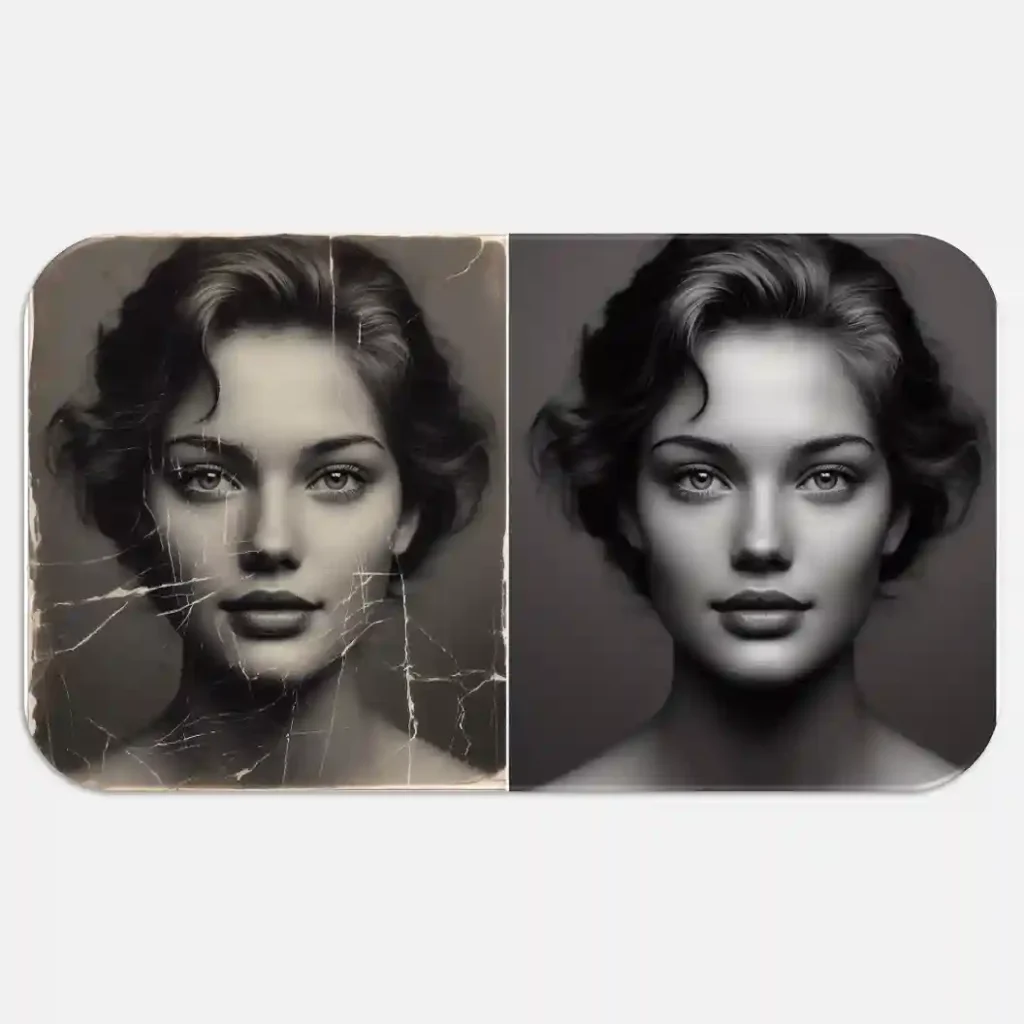
Old photos are priceless. They hold memories of people, places, and events we never want to forget. But with time, these photos may fade, tear, or get scratched. Luckily, with the help of image processing, we can bring these memories back to life. In this article, we will explain how restoring old images through image processing works in simple words.
What Is Image Restoration?
Image restoration is a process used to improve the quality of old or damaged photos. The goal is to remove noise, fix scratches, correct colors, and make the image clear again. This is done using image processing techniques and tools.
Why Restore Old Photos?
Here are some reasons to restore old images:
- Preserve memories: Keep your family history safe.
- Improve clarity: Make blurry or faded photos look sharp.
- Save digital copies: Create long-lasting versions of paper photos.
- Share online: Restored images are perfect for sharing with family or social media.
Common Problems in Old Images
Old photos often suffer from:
- Fading colors
- Scratches or cracks
- Dust or stains
- Blurriness
- Poor lighting
Image processing tools can fix these problems step by step.
Techniques Used to Restore Old Images
Here are some simple and practical image processing techniques used to restore old photos:
1. Noise Removal
Old photos often have grains or spots. Noise removal filters smooth out these spots without losing details.
2. Scratch and Dust Removal
Using tools like the healing brush or clone stamp in photo editing software can remove scratches, dust, and cracks.
3. Color Correction
Old photos may lose their original colors. Color correction tools adjust brightness, contrast, and saturation to make the image look fresh.
4. Sharpening
Blurry images can be improved using sharpening filters. This helps in bringing out the edges and details.
5. Image Inpainting
This method fills in missing or damaged parts of a photo. It uses the nearby pixels to guess what the missing part should look like.
6. Histogram Equalization
This technique improves the contrast of the image. It spreads out the most frequent pixel values, making the image clearer.
Tools for Restoring Old Images
There are many tools available for image restoration:
- Adobe Photoshop – Powerful but may need some skill.
- GIMP – A free tool with great features.
- Remini – AI-powered app for quick fixes.
- Fotor or PhotoScape – Simple and user-friendly.
AI-based tools are also becoming popular. They can restore images with just one click, using machine learning.
How Does Histeq Improve Image Quality? A Complete Guide + 4 Code
Step-by-Step Example of Image Restoration
Here’s a basic example using image processing software:
- Scan your old photo in high resolution.
- Open the image in your editing software.
- Use the crop tool to remove unwanted borders.
- Apply a noise reduction filter.
- Remove scratches using the clone stamp tool.
- Adjust color using color balance and contrast settings.
- Apply sharpening to improve clarity.
- Save the restored photo in a high-quality format.
Tips for Better Results
- Always work on a copy of the original image.
- Use non-destructive editing layers.
- Zoom in while fixing small areas.
- Use AI tools for fast restoration, especially if you’re a beginner.
Final Thoughts
Restoring old images through image processing is both rewarding and practical. You don’t need to be an expert to start. With the right tools and techniques, anyone can bring old memories back to life.
Whether you’re saving a family photo album or just curious about the technology, image restoration is a valuable skill in the digital age.
FAQs
Q: Can I restore old images for free?
Yes, tools like GIMP and some mobile apps offer free options for basic restoration.
Q: How long does it take to restore an image?
It depends on the damage. Simple fixes may take minutes, while detailed work can take hours.
Q: Do I need professional skills?
Not always. Many tools offer automatic features, but learning manual editing helps for better results.








![Successful Investment: Mastering the Art of Financial Growth [ e-book 2024]](https://digitfile.com/wp-content/uploads/2024/03/71.webp)
![Achieve Brilliance: Strategies for Academic Success [E-book 2024]](https://digitfile.com/wp-content/uploads/2024/03/8l.webp)

