




![Successful Investment: Mastering the Art of Financial Growth [ e-book 2024]](https://digitfile.com/wp-content/uploads/2024/03/71.webp)

![Earn Crypto Easily – No Skills Needed, No Investment Required! [2025] pdf](https://digitfile.com/wp-content/uploads/2025/02/earncrypto-1.webp)


Introduction
Enhancing image quality is essential in various fields, from photography to medical imaging. How Does Histeq Improve Image Quality? is a common question in digital image processing. Histogram Equalization (Histeq) is a proven method to improve contrast and clarity by redistributing pixel intensity. This technique makes image details more visible, particularly in low-light or poor-quality images. In this guide, we’ll explore the benefits, applications, and best practices of Histeq, along with practical coding examples in multiple programming languages to help you implement it effectively.
What is Histogram Equalization (Histeq)?
Histogram Equalization (Histeq) is a digital image processing technique used to improve image contrast by redistributing pixel intensity. It enhances details in images by spreading out the most frequent intensity values, making dark regions lighter and bright regions darker.
Histeq is widely used in:
- Photography – Improving images taken in low light.
- Medical Imaging – Enhancing X-rays and MRI scans.
- Satellite Imagery – Increasing visibility of geographical data.
- Forensic Science – Improving quality of security footage.
How Histeq Enhances Images
Histogram Equalization (Histeq) plays a pivotal role in enhancing images by adjusting pixel intensity distribution across the entire image. It is particularly useful for improving the quality of images that are too dark, too bright, or lack contrast. By applying Histeq, you can achieve the following improvements:
1. Improving Image Contrast and Clarity
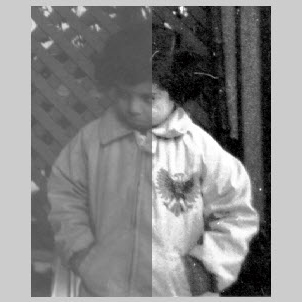
One of the primary benefits of Histeq is its ability to enhance contrast, making details in an image more visible. It works by redistributing the image’s pixel intensity values, spreading out the most frequent pixel intensities. As a result, regions of the image that were too dark or too bright become more distinguishable.
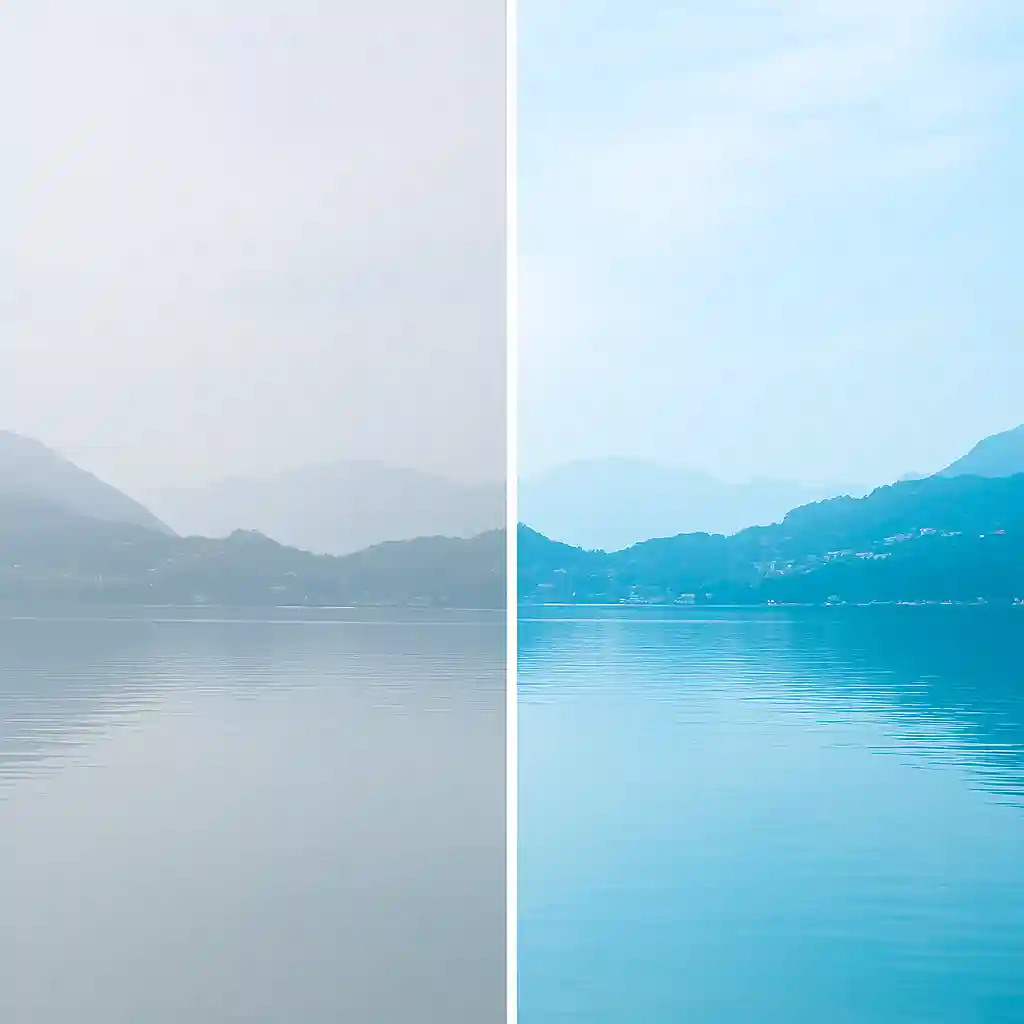
- Before Histeq: An image with poor contrast might have regions where details are hard to distinguish because the pixel values are clustered around a narrow range of intensities.
- After Histeq: The pixel values are spread over a broader range, improving the visibility of both the dark and bright regions, resulting in a clearer and more distinct image.
2. Enhancing Details in Low-Contrast Areas
In images captured under poor lighting or with high noise levels, fine details often get lost in the shadows or washed out in the highlights. Histeq helps by redistributing pixel intensities more evenly across the dynamic range of the image. This makes subtle details, such as textures, edges, and patterns, more apparent.
For instance, in medical imaging, such as X-rays or MRIs, small but important features like blood vessels or tumors that are not visible in a low-contrast image become more discernible after histogram equalization.
3. Uniform Brightness Distribution
Histeq works by enhancing the overall brightness of the image in a way that maintains uniformity. In many images, parts of the image may be overexposed (too bright) or underexposed (too dark). Histeq ensures that the brightness levels across the image are balanced, making the overall picture more uniform and visually appealing.
For example, an image captured at night may have areas that are completely dark while others are too bright. Histeq reduces the difference in brightness, providing a more balanced and natural look.
4. Highlighting Important Features
By improving contrast and adjusting brightness levels, Histeq helps in emphasizing important features within the image. This can be especially useful in applications such as:
- Facial recognition where the key facial features need to be clearer.
- Object detection where specific elements in an image need to be distinguished from the background.
- Medical imaging where crucial details like tumors or fractures need to be highlighted for diagnosis.
By making these features more prominent, Histeq ensures that the most critical components of the image stand out and are easier to analyze or interpret.
5. Better Image Analysis in Computer Vision
In computer vision applications, such as object detection and automated analysis, image enhancement is crucial. Histeq prepares an image by making it easier for algorithms to identify patterns and features. The enhanced contrast improves edge detection, allowing for better segmentation and feature extraction, which is vital for tasks like:
- Autonomous driving – recognizing obstacles or road signs.
- Facial recognition – detecting faces in various lighting conditions.
- Robotic vision – identifying and manipulating objects in the environment.
6. Improvement in Images with Poor Lighting
Images taken in low-light conditions tend to have weak contrast, often resulting in shadows and indistinguishable objects. Histeq can significantly enhance such images by stretching the pixel intensity range, making the objects in dark areas more visible and the overexposed parts less dominant. This is particularly useful for:
- Night-time photography
- Security footage where the image is dark and needs to reveal hidden details, such as faces or objects in shadows.
- Surveillance systems that need to detect movement in poorly lit environments.
7. Application in Multi-Dimensional Data
In multi-dimensional images, such as those captured by satellites or in medical imaging, the effect of Histeq is even more pronounced. These images contain multiple layers of data (e.g., different wavelengths of light or multi-slice scans). Histeq can be applied to each layer separately to improve visibility across all dimensions, enabling clearer analysis and interpretation.
For example, in remote sensing, satellite images that involve varying atmospheric conditions or topography can benefit from Histeq by making regions of interest more visible, like water bodies or urban areas, which are otherwise difficult to distinguish due to atmospheric noise.
8. Increased Image Aesthetic Appeal
In addition to functional improvements, Histeq can also be used to enhance the aesthetic appeal of an image. Photographers and artists use this technique to create images that are visually striking, with balanced lighting and enhanced detail. This is especially useful for artistic photos, where the goal is to bring out the textures and details in shadows and highlights, giving the image a more dramatic or polished look.
By improving contrast, brightness, clarity, and feature visibility, Histogram Equalization enhances the overall quality of images, making them suitable for a wide range of applications, from scientific research to photography. The effect of Histeq is especially useful when dealing with images captured under challenging conditions, such as poor lighting, or when subtle details need to be accentuated.
Benefits of Using Histeq for Image Enhancement
- Improved Image Quality – Enhances visual appeal and detail clarity.
- Better Feature Extraction – Useful in AI and machine learning applications.
- Enhanced Medical Imaging – Helps in detecting details in X-rays and MRI scans.
- Optimized for Digital Photography – Enhances poorly lit images.
- Better Recognition and Detection – Ideal for security and surveillance applications.
Applications of Histeq in Various Fields
- Medical Imaging: Enhances X-rays and MRI scans for better diagnosis.
- Remote Sensing: Improves satellite images for geographical analysis.
- Security and Surveillance: Enhances CCTV footage for better identification.
- Computer Vision: Used in AI models for object recognition.
- Gaming and Augmented Reality: Enhances realism in virtual environments.
How to Apply Histeq to Images
Applying Histeq to an image can be done using software like:
- OpenCV: A popular computer vision library.
- Matlab: Offers built-in functions for Histeq.
- Python (PIL & NumPy): Useful for custom implementations.
- C++ / C: Low-level implementation using OpenCV or direct processing.
- Java: Implemented using Java’s BufferedImage class and OpenCV.
Example Python Code Using OpenCV:
import cv2
import numpy as np

# Load image in grayscale
image = cv2.imread('input.jpg', 0)

# Apply Histogram Equalization
histeq_image = cv2.equalizeHist(image)

# Save the enhanced image
cv2.imwrite('enhanced.jpg', histeq_image)

# Display the original and enhanced images
cv2.imshow('Original Image', image)
cv2.imshow('Histogram Equalized Image', histeq_image)
cv2.waitKey(0)
cv2.destroyAllWindows()
Example Matlab Code:
image = imread('input.jpg');
gray_image = rgb2gray(image);
histeq_image = histeq(gray_image);
imwrite(histeq_image, 'enhanced.jpg');
imshowpair(gray_image, histeq_image, 'montage');
title('Original vs. Histogram Equalized Image');
Example C++ Code Using OpenCV:
#include <opencv2/opencv.hpp>
using namespace cv;

int main() {
    Mat image = imread("input.jpg", IMREAD_GRAYSCALE);
    Mat histeq_image;
    equalizeHist(image, histeq_image);
    imwrite("enhanced.jpg", histeq_image);
    imshow("Original Image", image);
    imshow("Histogram Equalized Image", histeq_image);
    waitKey(0);
    return 0;
}
Example Java Code:
import java.awt.image.BufferedImage;
import java.io.File;
import javax.imageio.ImageIO;
import org.opencv.core.*;
import org.opencv.imgcodecs.Imgcodecs;
import org.opencv.imgproc.Imgproc;

public class HisteqExample {
    static { System.loadLibrary(Core.NATIVE_LIBRARY_NAME); }
    public static void main(String[] args) {
        Mat image = Imgcodecs.imread("input.jpg", Imgcodecs.IMREAD_GRAYSCALE);
        Mat histeqImage = new Mat();
        Imgproc.equalizeHist(image, histeqImage);
        Imgcodecs.imwrite("enhanced.jpg", histeqImage);
    }
}
learn more : 4 way for Converting RGB image to Grayscale in MATLAB – digitfile
Best Practices for Image Enhancement with Histeq
- Use High-Quality Input Images – Poor-quality images may not benefit significantly.
- Avoid Over-Processing – Too much enhancement can introduce noise.
- Combine with Other Techniques – Methods like CLAHE (Contrast Limited Adaptive Histogram Equalization) can be more effective.
- Test with Different Parameters – Different images require different enhancement levels.
- Consider Alternative Approaches – If Histeq doesn’t yield optimal results, try adaptive methods.
Common Challenges and Solutions in Histeq Implementation
- Over-Enhancement of Noise: Solution – Apply smoothing techniques like Gaussian Blur before Histeq.
- Loss of Detail in Bright or Dark Areas: Solution – Use Adaptive Histogram Equalization (AHE) or CLAHE.
- Uneven Contrast Improvement: Solution – Test different histogram bins and parameters to fine-tune results.
Advanced Techniques for Image Enhancement
To achieve even better image enhancement, advanced techniques can be applied beyond traditional histogram equalization. Here are some of the most effective methods:
1. Adaptive Histogram Equalization (AHE)
Unlike standard Histeq, which applies equalization globally to the entire image, Adaptive Histogram Equalization (AHE) divides an image into small regions (tiles) and applies histogram equalization to each separately. This method is particularly useful when different parts of an image have varying brightness levels. However, AHE may over-amplify noise in low-contrast regions.
2. Contrast Limited Adaptive Histogram Equalization (CLAHE)
To address the noise amplification issue in AHE, Contrast Limited Adaptive Histogram Equalization (CLAHE) limits the contrast enhancement in each region. This is achieved by clipping the histogram at a predefined threshold and redistributing the excess pixels. CLAHE is widely used in medical imaging (e.g., enhancing X-rays and MRI scans) and video processing.
3. Gamma Correction
Gamma correction adjusts the overall brightness of an image by applying a nonlinear transformation to pixel intensities. It is particularly effective in images that appear too dark or too bright.
Gamma correction is commonly used in photography, television displays, and medical imaging.
4. Multi-Scale Retinex (MSR)
Multi-Scale Retinex (MSR) is a technique that enhances both local and global contrast by simulating how the human eye perceives an image. MSR processes an image at different scales to enhance details in both bright and dark areas. This technique is highly effective for enhancing natural images, satellite images, and forensic applications.
5. Homomorphic Filtering
Homomorphic filtering enhances contrast while simultaneously reducing noise by separating illumination and reflectance components in an image. This technique is particularly useful in medical imaging and satellite imagery, where varying lighting conditions can impact clarity.
6. Wavelet-Based Enhancement
Wavelet transform techniques can be used to enhance image contrast by decomposing an image into different frequency components and selectively enhancing certain details while suppressing noise. This method is often used in biometric recognition systems and medical image processing.
7. Unsharp Masking and High-Pass Filtering
Unsharp masking is a traditional technique where a blurred version of an image is subtracted from the original to enhance edges and fine details. High-pass filtering is a more refined approach that preserves high-frequency details while suppressing lower-frequency components.
Choosing the Right Enhancement Technique
Each of the above methods has its strengths and limitations. The choice of technique depends on the application:
- Medical Imaging: CLAHE, Wavelet-Based Enhancement, Homomorphic Filtering
- Satellite and Remote Sensing: MSR, Adaptive Histogram Equalization, Gamma Correction
- Forensic Image Processing: Multi-Scale Retinex, Unsharp Masking, High-Pass Filtering
- Photography & Display Optimization: Gamma Correction, CLAHE, Unsharp Masking
By combining different techniques, you can achieve superior image enhancement results tailored to your specific application.
Conclusion
How Does Histeq Improve Image Quality? This guide has provided a detailed explanation of Histogram Equalization (Histeq), demonstrating its benefits, applications, and implementation using multiple programming languages. Whether you’re enhancing medical images, satellite photos, or digital photography, Histeq remains a powerful tool. By following best practices and combining techniques, you can achieve high-quality image enhancements for various professional and creative applications.
For further reading, check out this article on OpenCV Histeq.