








![Earn Crypto: The Ultimate Guide to Online Income with Digital Currency Payments [ E-book 2024 ]](https://digitfile.com/wp-content/uploads/2024/03/7.webp)
![Earn Crypto Easily – No Skills Needed, No Investment Required! [2025] pdf](https://digitfile.com/wp-content/uploads/2025/02/earncrypto-1.webp)
Introduction
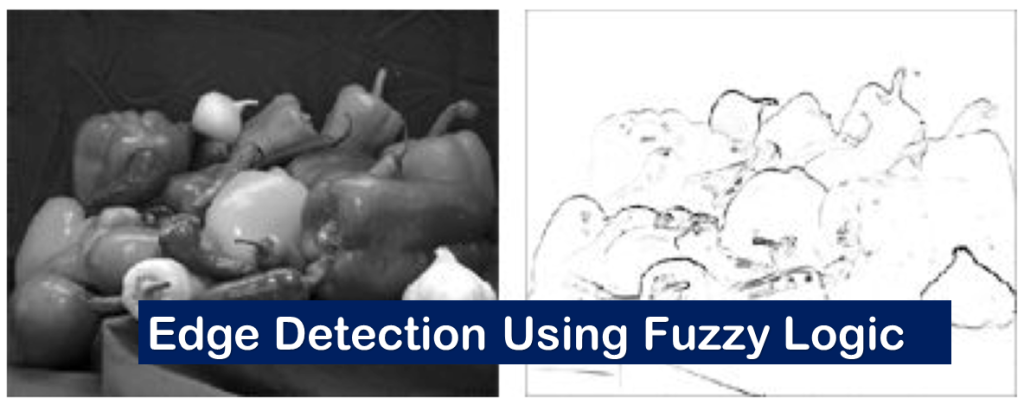
Edge detection is one of the most essential tasks in image processing. It involves identifying object boundaries within images, which is useful in computer vision, medical imaging, and robotics.
This article presents a complete implementation of edge detection using fuzzy logic in MATLAB. Fuzzy logic mimics human reasoning and helps produce more robust and noise-tolerant edge detection compared to classical methods.
What is Edge Detection?
Edge detection is the process of locating sharp changes in intensity in an image. These changes usually correspond to object boundaries or texture changes.
Some common edge detection techniques include:
- Sobel operator
- Canny edge detector
- Prewitt operator
However, these traditional methods are often sensitive to noise and may fail in complex scenarios. Fuzzy logic offers a solution by applying soft reasoning.
Why Use Fuzzy Logic for Edge Detection?
Fuzzy logic allows the system to handle uncertainty and imprecision. In this method:
- Gradients in the X and Y directions are treated as input variables.
- If-then fuzzy rules are applied to determine if a pixel is part of an edge.
- The result is a smoother and more intelligent edge detection.
Fuzzy Logic-Based Edge Detection in MATLAB
Let’s explore how to implement edge detection using fuzzy logic in MATLAB with a complete breakdown of the code.
Step-by-Step Explanation of the MATLAB Code
1. Clear Environment and Load Image
clc; clear all; close all;
Irgb = imread('gantrycrane.png');
figure; imshow(Irgb);
This part clears the workspace and loads the sample image gantrycrane.png which is included in MATLAB.
2. Convert RGB to Grayscale
Igray = 0.2989*Irgb(:,:,1) + 0.5870*Irgb(:,:,2) + 0.1140*Irgb(:,:,3);
figure; image(Igray,'CDataMapping','scaled'); colormap('gray');
title('Input Image in Grayscale');
The RGB image is converted to grayscale using standard luminance coefficients. This makes processing easier and reduces complexity.
3. Normalize the Image
I = double(Igray);
classType = class(Igray);
scalingFactor = double(intmax(classType));
I = I / scalingFactor;
The grayscale image is converted to double-precision and normalized to a [0,1] scale, which is required for fuzzy logic processing.
4. Compute Image Gradients
Gx = [-1 1];
Gy = Gx';
Ix = conv2(I, Gx, 'same');
Iy = conv2(I, Gy, 'same');
figure; image(Ix,'CDataMapping','scaled'); colormap('gray'); title('Ix');
figure; image(Iy,'CDataMapping','scaled'); colormap('gray'); title('Iy');
We use simple gradient kernels to compute the change in intensity in the X and Y directions using 2D convolution. These gradients help us determine edges.
5. Create the Fuzzy Inference System (FIS)
edgeFIS = newfis('edgeDetection');
A new FIS named edgeDetection is created.
6. Define Inputs and Membership Functions
edgeFIS = addvar(edgeFIS, 'input', 'Ix', [-1 1]);
edgeFIS = addvar(edgeFIS, 'input', 'Iy', [-1 1]);
sx = 0.1; sy = 0.1;
edgeFIS = addmf(edgeFIS, 'input', 1, 'zero', 'gaussmf', [sx 0]);
edgeFIS = addmf(edgeFIS, 'input', 2, 'zero', 'gaussmf', [sy 0]);
Two input variables Ix and Iy are added with Gaussian membership functions labeled zero.
7. Define Output and Membership Functions
edgeFIS = addvar(edgeFIS, 'output', 'Iout', [0 1]);
wa = 0.1; wb = 1; wc = 1;
ba = 0; bb = 0; bc = 0.7;
edgeFIS = addmf(edgeFIS, 'output', 1, 'white', 'trimf', [wa wb wc]);
edgeFIS = addmf(edgeFIS, 'output', 1, 'black', 'trimf', [ba bb bc]);
The output variable Iout has two triangular membership functions: white (not an edge) and black (edge).
8. Visualize Membership Functions
figure
subplot(2,2,1); plotmf(edgeFIS, 'input', 1); title('Ix');
subplot(2,2,2); plotmf(edgeFIS, 'input', 2); title('Iy');
subplot(2,2,[3 4]); plotmf(edgeFIS, 'output', 1); title('Iout');
This step helps visualize how the fuzzy system interprets input gradients and maps them to outputs.
learn more : How Does Histeq Improve Image Quality? A Complete Guide + 4 Code
9. Define Fuzzy Rules
r1 = 'If Ix is zero and Iy is zero then Iout is white';
r2 = 'If Ix is not zero or Iy is not zero then Iout is black';
r = char(r1, r2);
edgeFIS = parsrule(edgeFIS, r);
showrule(edgeFIS);
Two simple rules:
- If both gradients are zero, the pixel is not an edge.
- If either gradient is non-zero, it is likely an edge.
10. Evaluate FIS on the Image
Ieval = zeros(size(I));
for ii = 1:size(I,1)
    Ieval(ii,:) = evalfis([(Ix(ii,:)); (Iy(ii,:));]', edgeFIS);
end
The fuzzy inference system is applied to every pixel of the image using the gradients as input.
11. Display Results
figure; image(I, 'CDataMapping','scaled'); colormap('gray');
title('Original Grayscale Image');

figure; image(Ieval, 'CDataMapping','scaled'); colormap('gray');
title('Edge Detection Using Fuzzy Logic');

figure; imshow(Ieval, []);
The final edge-detected image is displayed using fuzzy logic reasoning. You can compare it with the original grayscale image.
Final Output and Results
Using fuzzy logic, the edges in the image are detected smoothly and accurately. The method handles soft transitions and noise better than classic gradient-based detectors.
Conclusion
Edge detection using fuzzy logic in MATLAB offers a powerful alternative to traditional methods. By combining gradient analysis with fuzzy reasoning, we achieve better results in complex and noisy images.
This approach is especially valuable in fields like:
- Medical imaging
- Industrial inspection
- Autonomous vehicles
- Robotics and automation
You can experiment with more complex fuzzy rules or combine this with machine learning for even better results.
References
- MathWorks – Fuzzy Logic Toolbox
- Image Processing Toolbox Documentation
- Introduction to Fuzzy Logic – Wikipedia